October 8, 2024
The Free Wedding Day Timeline Generator That Plans Around Your Golden Hour
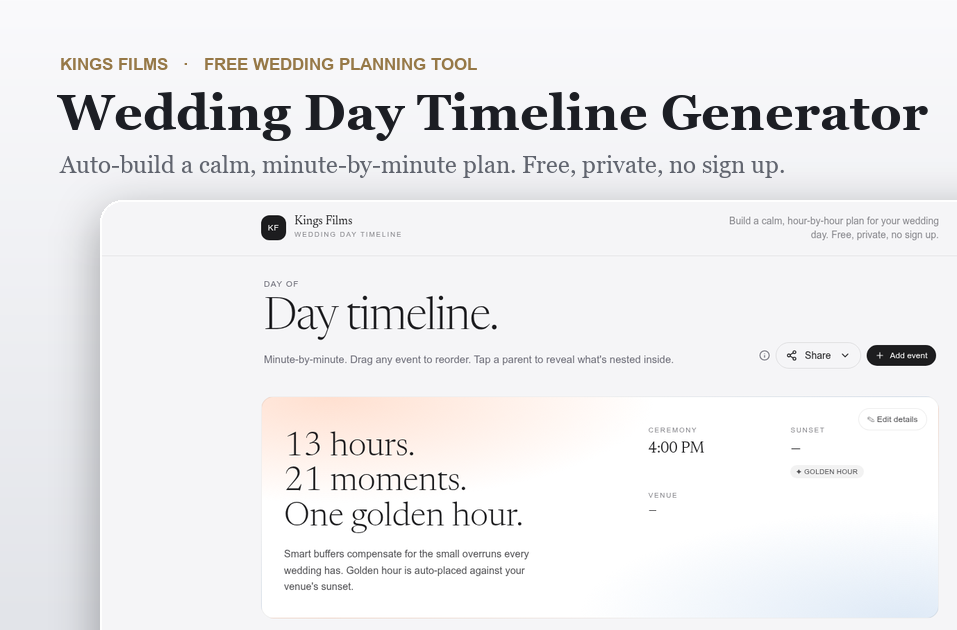
A wedding day timeline is the hour-by-hour plan that keeps everyone, from your photographer to your caterer to your families, moving in sync. The free Kings Films wedding day timeline generator builds that plan for you in seconds. Set your ceremony time and venue, and it lays out a calm, minute-by-minute schedule you can reorder, edit, and print. It is free, it is private, and it needs no account or email to use.
We are Kings Films, documentary wedding filmmakers based in Minnesota. We built this tool from the same timeline we use to prepare for every wedding we film, then made it free for any couple to use. By Ariel Reyes. Last updated May 31, 2026.
What is a wedding day timeline generator?
A wedding day timeline generator is a planning tool that turns a single anchor, your ceremony start time, into a full schedule for the day. Instead of staring at a blank document and guessing how long hair and makeup takes or when to start portraits, you get a realistic plan to react to. Our generator creates a complete day of 21 events across getting ready, portraits, the ceremony, travel, and the reception, each with a sensible duration you can adjust. Most couples have a working draft in under a minute.
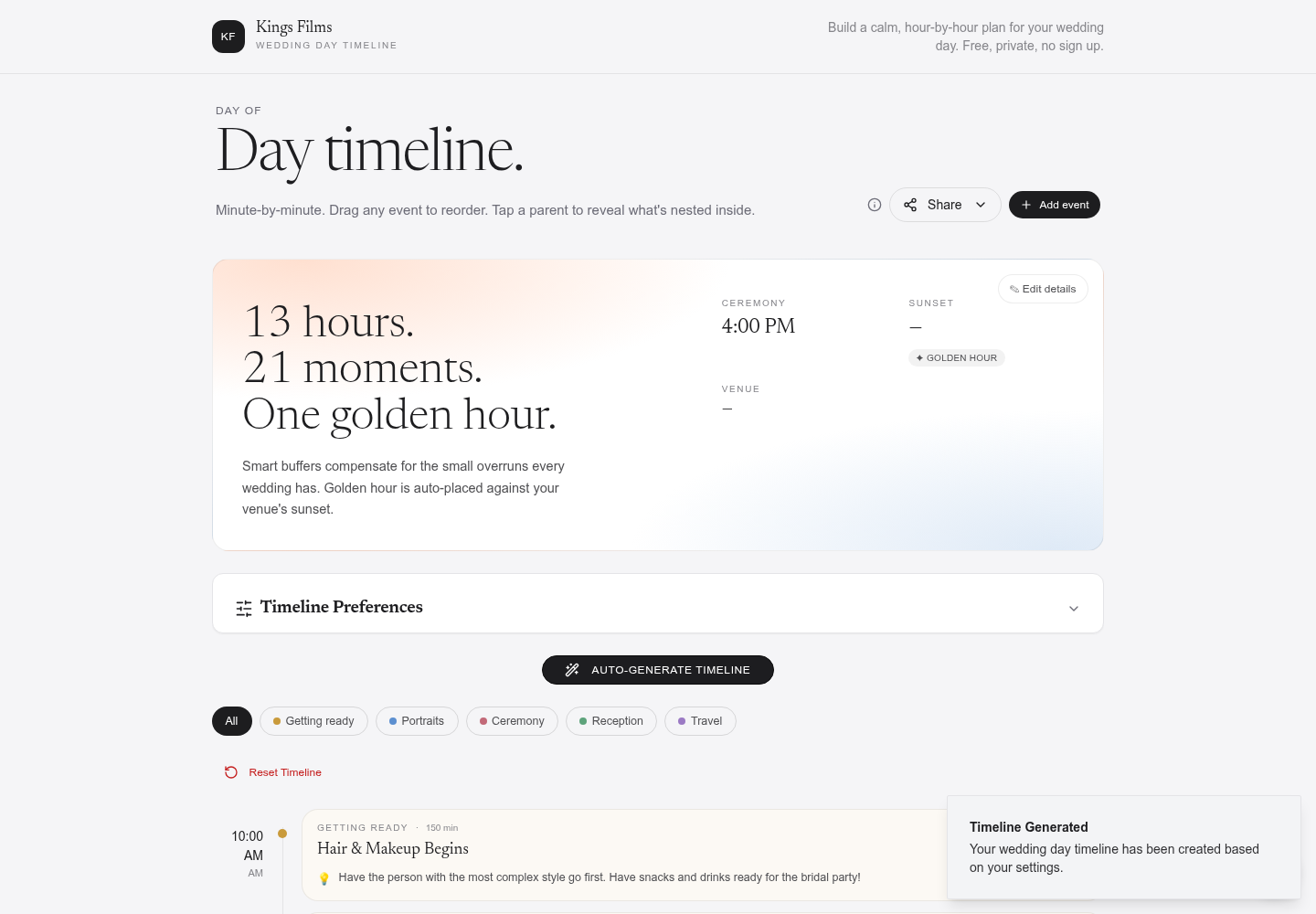
One tap builds a full minute-by-minute plan, organized by part of the day.
How does the Kings Films timeline generator work?
Open the tool, set your wedding date, ceremony time, and venue, then tap Auto-Generate. It builds the entire day backward and forward from your ceremony, so hair and makeup, the first look, family formals, dinner, toasts, and the last dance all land where they should. Every event is yours to change. Adjust a duration, drag an event to a new spot, add something specific to your day, or remove what you do not need. The plan recalculates as you go.
What makes this wedding timeline generator different?
Plenty of tools will hand you a generic list. This one was built by people who spend every weekend inside real wedding days, so it solves the problems that actually derail a schedule.
Golden hour, placed against your venue's real sunset
This is the feature couples tell us they have never seen anywhere else. Add your venue address and wedding date, and the generator looks up the actual sunset time for that location and that day, then places your golden hour portraits in the soft light right before it. The event is even labeled with the exact sunset time. Golden light is brief and it does not wait, so protecting 30 minutes for it is one of the highest-value decisions on your timeline. The tool does that math for you instead of leaving it to chance.
Smart buffers that keep the day from running late
Every wedding runs a few minutes long in a dozen small places. Our generator adds quiet buffers between events so those small overruns do not collapse the back half of your night. You can leave the buffers on Smart, where they adapt to each part of the day, or switch to a Fixed amount you control. It is the difference between a plan that looks good on paper and one that survives contact with a real Saturday.
Drag to reorder, nested events, and category views
The whole timeline is hands-on. Drag any event to reorder it. Open a parent event, like open dancing, to reveal the moments nested inside it, such as the cake cutting and the bouquet toss. Filter the day by getting ready, portraits, ceremony, reception, or travel so you can hand your hair and makeup artist only the part that matters to them. Color coding keeps each phase easy to read at a glance.
Guidance built in from people who film weddings
Many events carry a short, practical note from our experience on wedding days. Do not skip lunch, and have it delivered to the getting-ready suite so no one wanders off. Appoint a family member to wrangle relatives for formals so you are not chasing an uncle through cocktail hour. Protect golden hour. These are the small things that quietly decide whether the day feels calm or rushed.
Private by design
Your timeline lives in your own browser. There is no sign up, no email gate, and nothing is sent to a server you do not control. When you are ready, print a clean copy or share it with your planner and vendors so everyone is working from the same plan.
Why a calm timeline matters for your wedding film
We make interview-led legacy wedding films, which means the most important parts of your day are the real ones. The unscripted laugh during getting ready. The look on a parent's face. The words said in a toast. None of that happens on cue, and none of it happens well when the day is 40 minutes behind and everyone is anxious about the schedule.
A timeline with room to breathe is what lets you stay present instead of performing, and presence is exactly what an observational filmmaker is there to preserve. A protected golden hour gives us the light that makes a film feel timeless. Buffers give moments space to unfold on their own. If you would like your day preserved this way, you can start a conversation with us about a documentary wedding film. The tool is yours to keep either way.
How to build your wedding day timeline
- Open the wedding day timeline generator.
- Enter your wedding date, ceremony time, and venue. Add the venue address so golden hour can be calculated.
- Tap Auto-Generate to build the full day.
- Adjust durations, drag events to reorder them, and add or remove anything specific to your plans.
- Print your timeline or share it with your planner, photographer, and other vendors.
Once your timeline is set, pair it with our wedding budget calculator to keep the rest of your planning grounded.
Wedding day timeline generator FAQ
Is the wedding timeline generator free?
Yes. The Kings Films wedding day timeline generator is completely free. There is no trial, no upgrade, and no payment of any kind.
Do I need to create an account or share my email?
No. There is no sign up and no email gate. Your timeline is stored privately in your own browser, not on our servers.
How does the tool calculate golden hour?
When you add your venue location and wedding date, the generator looks up the real sunset time for that place and day, then schedules your golden hour portraits in the soft light just before sunset. The event is labeled with the exact sunset time.
Can I customize the timeline after it generates?
Yes. Every event is editable. You can change durations, drag events to reorder them, add new events, delete ones you do not need, and filter the day by category.
What time should my ceremony start?
A good rule is to work backward from sunset so your portraits land in golden light. Set a ceremony time in the generator, add your venue, and the sunset lookup and smart buffers will show you quickly whether your timing leaves room for the light you want.
Start your wedding day timeline
You can build your full wedding day plan right now, free and private, with the Kings Films wedding day timeline generator. And when you are ready to talk about preserving the real voices and moments of your day in a documentary wedding film, we would love to hear your story.
Frequently Asked Questions
Yes. The Kings Films wedding day timeline generator is completely free. There is no trial, no upgrade, and no payment of any kind.
No. There is no sign up and no email gate. Your timeline is stored privately in your own browser, not on our servers.
When you add your venue location and wedding date, the generator looks up the real sunset time for that place and day, then schedules your golden hour portraits in the soft light just before sunset. The event is labeled with the exact sunset time.
Yes. Every event is editable. You can change durations, drag events to reorder them, add new events, delete ones you do not need, and filter the day by category.
A good rule is to work backward from sunset so your portraits land in golden light. Set a ceremony time in the generator, add your venue, and the sunset lookup and smart buffers will show you quickly whether your timing leaves room for the light you want.